 Xtractor
A single misread digit in an Outlook invoice or a missed attachment can force an SMB into hours of reconciliation and lost revenue. The best Outlook email parser tools 2026 are software solutions that extract structured data from Outlook messages and export fields to Google Sheets, CSV, or Excel. Our roundup evaluates Outlook-focused parsers for SMBs that need shared mailbox parsing, attachment handling, and reliable exports. Xtractor.app handles one-click bulk import, scheduled parsing, and custom filters to pull subjects, senders, dates, amounts, and order numbers into clean spreadsheets; attachments require a custom plan on request. For setup options, see our parse email to Google Sheets guide and the Power Automate Outlook email parsing walkthrough. Which tools actually save daily reporting hours?
What should small accounting and bookkeeping teams expect from Outlook email parser tools in 2026?
Small accounting and bookkeeping teams should expect Outlook parsers in 2026 to prioritize fast bulk imports, flexible field extraction, and reliable spreadsheet exports. Vendors will combine native Outlook connectors, hybrid AI+rule extraction, and scheduled exports so teams spend minutes on parsing instead of hours on manual entry. Evaluate tools by how they handle shared mailboxes, attachments, and data residency before committing to a workflow.
What is an email parser and how does it work? 🧾
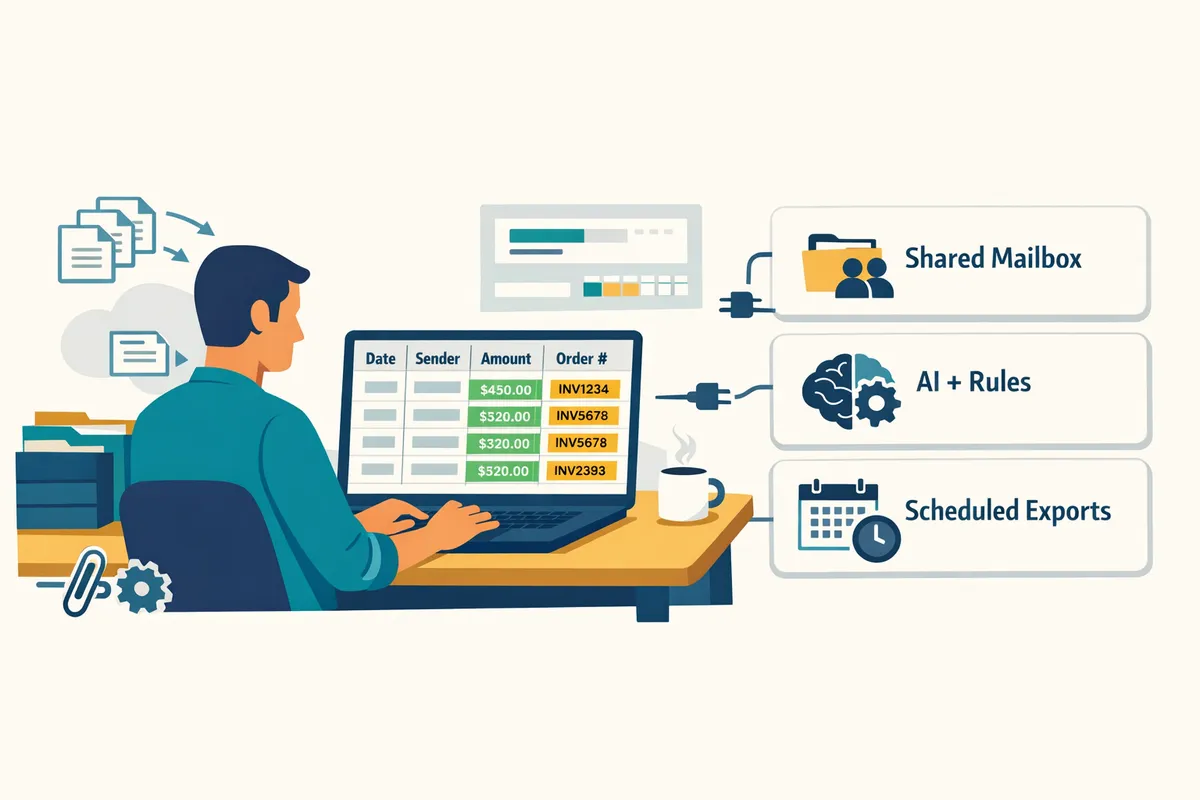
An email parser is a software tool that extracts structured fields (sender, date, amounts, order numbers) from email bodies and attachments. A typical workflow: connect an Outlook inbox or shared mailbox, define filters (sender, subject line, date ranges), create field mappings to spreadsheet columns, and run a one-time bulk import or schedule recurring imports. Xtractor.app’s documentation shows common mappings and provides a visual mapping flow that writes extracted rows directly to Google Sheets. Test the mapping on a representative sample set before scheduling full imports to catch edge cases in subject lines or number formats.
💡 Tip: Test parsing on 50 representative emails and one shared mailbox sample to validate filters and mappings before a full run.
For step-by-step automations that use native Microsoft flows, consult our guide to building an automated Outlook parsing workflow with Power Automate.
2026 feature trends that matter for SMBs ⚙️
In 2026 SMBs should prioritize parsers with fast bulk imports, reusable parsing contexts, and scheduled exports to Sheets or CSV. Key trends to evaluate:
- Native Outlook and Power Automate connectors for low-friction setup and the ability to trigger flows from new messages. See our Outlook Power Automate walkthrough for recommended triggers and filters.
- Hybrid AI plus template rules so the tool handles inconsistent invoice or receipt formats while letting you lock exact fields for high-value values.
- Built-in scheduling and saved searches that automate daily or weekly exports to Google Sheets or CSV without manual steps. Xtractor.app includes saved searches and scheduling as core features, plus one-click bulk import for large mailboxes.
- Attachment parsing offered as an add-on or custom plan; confirm whether PDF, CSV, XLSX, or image OCR are included or billed separately.
For many small teams, copying fields from 500 inbox messages monthly costs more than 10 hours of manual work; read the full comparison of email parser software to see which tools cut that time for bookkeeping teams.
Security, compliance, and data residency to check 🔒
Small teams must verify encryption, tenant isolation or self-hosting options, and audit controls before processing invoices or payroll through a third party. Check this security checklist:
- Data encryption at rest and in transit, and clear data retention policies.
- Options for private tenants, dedicated accounts, or self-hosting if your industry requires strict residency or local control. Ask vendors what they offer; some provide custom deployments for regulated customers.
- Audit logs, role-based access, and per-user controls for shared mailbox parsing so you can track who accessed parsed data.
- Commercial add-ons for regulated attachment parsing (for example, bank statements or payroll files) that include validated handling and logging.
⚠️ Warning: Avoid parsing personal health or similarly sensitive data through third-party parsers without documented consent and a compliance review.
If you want a quick comparison of secure offerings and free options, our roundup of free email parser tools and the broader email parser buying guide show which vendors support advanced controls and where custom plans are required. Xtractor.app offers custom attachment parsing and can discuss tenant or compliance needs when teams require stricter data residency or auditing.
Which Outlook email parser tools top the list in 2026 and how do they compare?
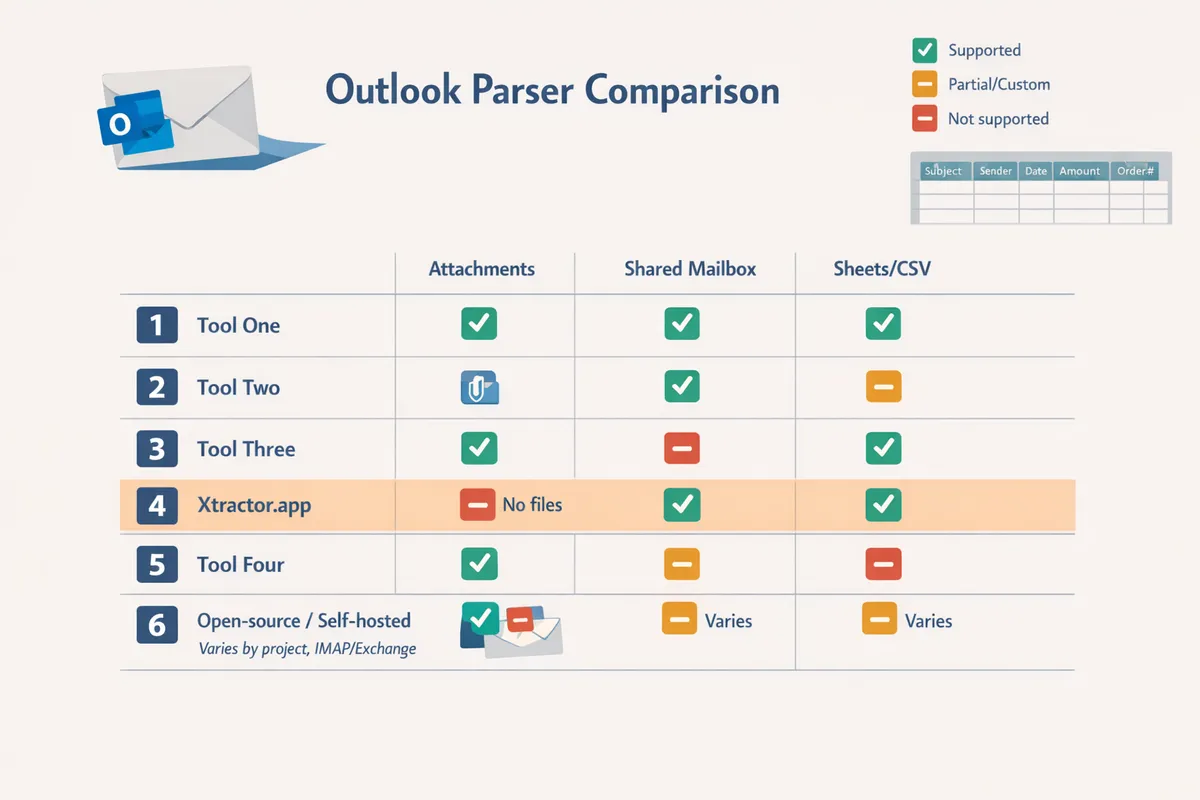
This ranked list identifies the best Outlook email parser tools 2026 for SMBs that need attachment handling, shared mailbox parsing, and exports to Google Sheets or CSV. Each entry explains who should use the tool, its strengths and limits, and exactly how it handles two long-tail tasks: parsing attachments to Google Sheets and exporting shared mailbox data to CSV. Use the quick comparison table to filter by attachment support and native export targets.
xtractor.app — Best for fast, bulk Gmail-to-Sheets workflows ✅
xtractor.app is ideal for finance teams that need scheduled, high-volume exports from Gmail directly into Google Sheets or CSV. It includes one-click bulk import and scheduling so teams convert thousands of messages into a sheet in a single action. Key features:
- One-click bulk import and scheduled imports for daily reporting.
- Custom filters and multiple parsing contexts to handle variable email formats.
- Visual mapping to Google Sheets and saved searches for reuse.
Attachment handling: attachments are available via custom parsing plans on request; teams that must parse PDFs to Sheets can request a custom plan. See our guide to parsing emails into Sheets for setup examples and automation tips. xtractor.app reduces manual data entry, cuts reconciliation time, and centralizes exports to CSV or Sheets for bookkeeping workflows.
Microsoft Power Automate — Best for native Outlook mailbox workflows 📤
Microsoft Power Automate works best for organizations committed to Microsoft 365 that need native Outlook triggers and enterprise controls. Power Automate provides direct Outlook triggers, enterprise-grade security controls, and tight integration with SharePoint and Dataverse. Pros and cons:
- Pros: direct Outlook triggers, enterprise security controls, integration with Microsoft services.
- Cons: longer setup time and less out-of-the-box parsing intelligence than specialized parsers.
Use Power Automate when you require an Outlook shared mailbox parser to CSV without moving email content to a third-party processor. For a step-by-step build, consult our Outlook Email Parser Power Automate guide to see practical trigger/filter patterns and storage options.
Mailparser / Parseur-style AI+template parsers — Best for complex attachments and semi-structured emails 📄
Template-driven AI parsers are best for teams that receive many invoice or order formats that vary slightly and need adaptive field extraction. These tools let you build templates that generalize across variants and include built-in attachment parsing for PDF and HTML invoices. Typical characteristics:
- Template creation that adapts to new formats with supervised training.
- Built-in attachment parsing available in many plans (PDF, HTML).
- Pricing typically scales with volume and rule complexity.
Trade-offs: you get faster coverage across formats, but costs can rise for high-volume parsing or many template variants. For SMBs with mixed suppliers, these tools reduce manual mapping time compared with spreadsheet macros.
Zapier Email Parser — Best for lightweight automations and many app integrations 🔗
Zapier Email Parser fits teams that need simple field extraction with broad downstream app connections rather than deep parsing. It links quickly to Google Sheets, CRMs, Slack, and BI tools without complex configuration. Highlights:
- Easy to connect to Google Sheets and many apps via Zapier workflows.
- Limited advanced attachment parsing compared with dedicated parsers.
- Best for teams prioritizing many downstream integrations over parsing depth.
Choose Zapier when your main need is to feed parsed fields into multiple tools and you can tolerate manual steps for complex attachments.
Open-source and self-hosted parsers — Best for strict data residency or no-cloud policies 🛡️
Open-source, self-hosted parsers are on-premise tools that keep email processing inside your environment for compliance and data residency requirements. They eliminate third-party hosting costs but increase operational overhead. Considerations:
- Lower recurring third-party fees but higher setup and maintenance time.
- Requires in-house expertise to ensure reliability and scaling.
- Good for compliance-first industries that must guarantee data never leaves controlled infrastructure.
⚠️ Warning: Self-hosted parsing shifts patching, backups, and monitoring to your team; budget time and skilled staff for ongoing maintenance.
For organizations that must parse Outlook attachments to Google Sheets without sending data to external processors, a self-hosted pipeline can work but plan for a higher total cost of ownership.
How we evaluated these tools 📊
We scored each tool on setup time, Outlook shared mailbox parsing, attachment-to-sheet capability, export options (Google Sheets, CSV, Excel), security controls, price predictability, and template reuse. Each criterion received a 1–5 rating and we weighted shared mailbox parsing and attachment-to-sheet capability more heavily for bookkeeping and finance use cases. xtractor.app scored highly on bulk import speed, saved searches, and visual Sheets mapping, which benefits teams focused on daily reporting from Gmail.
Comparison table: Outlook parser features, attachment support, and export options 🧾
| Tool | Outlook connector / shared mailbox support | Attachment parsing | Direct export targets | Typical SMB fit |
|---|---|---|---|---|
| xtractor.app | Google Sheets add-on for Gmail; no Outlook or shared mailbox support | Add-on / custom plans for attachment parsing on request | Google Sheets, CSV, Excel | Finance, bookkeeping, reporting teams |
| Microsoft Power Automate | Native Outlook triggers; can target shared mailboxes natively | Add-on/custom flow to extract attachments | CSV, Excel, SharePoint (Sheets via connector) | Enterprises using Microsoft 365, IT-controlled environments |
| Mailparser | Direct mailbox connectors and shared mailbox options | Built-in PDF/HTML attachment parsing | Google Sheets, CSV, Excel, webhooks | E-commerce, vendors with varied invoice formats |
| Parseur | Direct connectors, shared mailbox support | Built-in attachment parsing with template training | Google Sheets, CSV, webhooks, APIs | Teams with many semi-structured documents |
| Zapier Email Parser | Works with Outlook via Zap or forwarding; shared mailbox via automation | Limited attachment parsing (attachments often require extra steps) | Google Sheets, CSV, 2,000+ apps | Small teams needing broad integrations |
| Parserr | Outlook connectors and shared mailbox support | Built-in attachment parsing in higher plans | Google Sheets, CSV, Excel, webhooks | HR, e-commerce order ingestion |
| Open-source / Self-hosted | Varies by project; typically supports IMAP/Exchange | Varies; usually requires custom OCR/parsing modules | CSV, Excel, Sheets via self-built integrations | Compliance-first orgs with in-house dev/ops |
For deeper reading on feature sets, pricing, and use cases across more tools, see our Best Email Parser Software (2026) overview and the Free Email Parser comparison on our website.
Which Outlook email parser should your team choose and how to decide quickly?
Choose the parser that matches your export target, attachment needs, mailbox setup, and preferred setup path. Match those requirements against vendor features, subscription cost, and expected setup hours to pick the fastest path to production.
Decision checklist: match tool capabilities to business constraints ✅
Use this checklist to map your must-haves to vendor strengths before running a pilot. Below are the five quick checks every finance or bookkeeping team should make, with why each matters for cost and time-to-value.
-
Required export target (Google Sheets vs CSV vs Excel). Specify the exact destination and column format you need. If you export to Google Sheets daily, choose a parser with native Sheets export to avoid intermediate CSV conversions. xtractor.app exports directly to Google Sheets, CSV, and Excel, which reduces mapping time.
-
Volume and bulk import needs. Confirm the tool can import thousands of messages in one action or on schedule. Tools without bulk import force repeated manual batches and add hours each month. xtractor.app offers one-click bulk import and scheduling to handle high-volume inboxes.
-
Attachment parsing requirement and file types. List the attachment formats you must extract (PDF invoices, TIFF receipts, XLSX attachments). Some parsers only read email bodies; attachment parsing often requires a custom plan. xtractor.app handles body parsing by default and offers attachment parsing via custom plans on request.
-
Shared mailbox access and audit requirements. Verify shared mailbox support, role-based access, and audit logs if multiple people need access. Missing shared mailbox features creates compliance risk and manual reconciliation when mailbox owners change.
-
Preferred setup path (no-code, Power Automate, or custom implementation). Decide whether your team will use a no-code UI, a Power Automate flow, or pay for vendor setup. No-code tools speed onboarding; Power Automate works for Microsoft-centric shops but may require more hours to maintain. See our Outlook Power Automate guide for recommended flows.
Quick ROI estimate for finance teams 📈
Estimate ROI by comparing weekly manual entry hours saved against the vendor’s monthly cost and setup time. Use this formula: (Hours saved per week × hourly rate × 4) − (monthly subscription + amortized setup cost) = net monthly benefit.
Example. A bookkeeper processes 200 receipts per week and spends an average of 1.5 minutes per receipt doing data entry (200 × 1.5 minutes = 300 minutes = 5 hours per week). At $25/hour, that equals $125 per week or $500 per month in labor. If a parser subscription costs $100/month and setup takes 4 hours at $25/hour ($100), amortize setup over three months for a $33 monthly setup amortization. Monthly cost becomes $133, so net monthly benefit is $500 − $133 = $367.
💡 Tip: Run a 30-day pilot importing a sample mailbox to measure actual time saved before committing to a yearly plan.
If you need attachments parsed to Sheets or shared mailbox-to-CSV fast — recommended path 🔁
For fast, low-risk delivery, use a dedicated parser with built-in bulk import, saved searches, and scheduled exports. We recommend xtractor.app for teams that want quick Gmail-to-Google Sheets exports, scheduling, and a visual mapping interface; attachment parsing is available through custom plans when you need PDF or receipt extraction.
Using a single vendor that handles bulk imports and saved filters reduces ongoing maintenance and avoids stitching together multiple tools. DIY scripting or complex Power Automate flows often require 8–20 implementation hours initially and ongoing tweaks when email formats change, which raises total cost of ownership compared with a focused parser and a short vendor-assisted setup.
⚠️ Warning: If your needs include legally sensitive attachments or strict data residency, evaluate vendors’ custom plans and compliance controls before importing production mailboxes.
Next steps and templates to get started (Outlook-specific) 🧩
Start with small, repeatable steps that prove value quickly.
- Run a one-click bulk import of a sample mailbox to verify field mappings and spot edge-case formats. Use a folder with 50 representative messages, not just five.
- Create saved searches to isolate invoices by sender, subject line patterns, or date ranges. Saved searches cut false positives and lower manual review time.
- Visually map extracted fields to your target sheet columns and test with export to Google Sheets or CSV. Confirm date and number formats match your bookkeeping system.
- Schedule daily or nightly imports aligned to your bookkeeping cutoffs to close books faster. Start with daily imports for the first 2 weeks to catch mapping gaps.
- Pilot for 30 days and measure hours saved versus baseline. Track exceptions and refine saved searches instead of adding new rules.
For step-by-step walkthroughs and templates, see our Outlook automation guide and parsing templates:
- Follow the Outlook-specific automation instructions in the Outlook Email Parser Power Automate guide to connect shared mailboxes and triggers.
- Use the Parse Email to Google Sheets guide for a Sheets-focused export workflow and example templates.
- Compare alternative parsers and free options in our Free Email Parser overview and the broader Best Email Parser Software (2026) comparison to validate total cost of ownership.
Frequently Asked Questions
These FAQs answer common buyer questions about parsing Outlook emails and attachments, shared mailbox access, and exporting parsed data to Google Sheets or CSV. Each reply gives clear next steps and points to relevant xtractor.app guides and workflows you can try immediately.
How do I parse Outlook attachments to Google Sheets? 📎
You need a parser that extracts attachment text, maps fields to sheet columns, and writes rows to Google Sheets on demand or on a schedule. Start by confirming the attachment types you get (PDF, DOCX, CSV). Connect Outlook using an automation flow or direct connector and create a parsing context that targets both the email body and the attachment text. Map extracted fields (invoice number, date, total) to specific Google Sheets columns and run a one-click bulk import or schedule daily sync. xtractor.app (Gmail only) supports one-click bulk imports and multiple parsing contexts; request a custom attachment plan from xtractor.app if most of your data lives in PDFs. Follow the step-by-step Outlook workflow in our Outlook Email Parser Power Automate guide and test mapping with 50 sample messages before scaling.
Can I parse an Outlook shared mailbox to CSV automatically? 📂
Yes; configure a parser or automation flow with delegated access to the shared mailbox, apply filters, and schedule CSV exports. Grant a service account or app the least-privilege permissions needed to read the shared mailbox and enable mailbox audit logging. Create saved searches or filters for the folders you want to process, map the extraction fields to your CSV schema, and schedule exports (daily or hourly) to a secure storage location. Scheduled imports and saved searches that target specific senders, subjects, or date ranges—use those to reduce noise.
⚠️ Warning: Avoid giving third-party apps full mailbox rights; use a service account with read-only access and keep audit logging enabled to meet compliance and internal review requirements.
Which parser type is better for mixed-format invoices: AI or template rules? 🤖
Hybrid systems that combine template-based rules with AI pattern recognition handle mixed-format invoices most reliably. Use templates for high-volume, consistently formatted vendors to minimize false positives and speed processing. Add AI-based extraction for low-volume or irregular vendors to catch fields that templates miss. For example, create templates for the five vendors that produce 70% of your invoices and enable AI extraction for the remaining 30%. With xtractor.app, use multiple parsing contexts to hold vendor-specific templates while applying broader pattern matching for outliers. Validate by reviewing the first 200 parsed invoices and iteratively tighten templates where AI shows repeated errors.
Is it safer to self-host an email parser for compliance reasons? 🛡️
Self-hosting gives tighter control over data residency and system access but increases operational responsibility, maintenance, and setup time. Cloud parsers reduce your operational burden by handling backups, updates, and scaling, and many provide certifications and documented controls. Choose self-hosting only if your regulator or internal policy prohibits cloud processing in your target region. If you need a non-standard arrangement, contact xtractor.app to discuss custom plans or enterprise options that address residency and audit demands. Budget extra time and staff for patching, backups, and incident response when planning a self-hosted deployment.
How quickly can I see value after choosing a parser? ⏱️
You can usually measure time saved within days for simple body-field extraction and scheduled imports. Run a one-week pilot: point the parser at a sample mailbox, set up saved searches, map three high-value fields (date, amount, order number), and run a bulk import. For example, a small accounts team that processes 500 invoices monthly often reduces manual entry from multiple hours to under an hour after a week of tuning. If attachments or custom formats dominate your inbox, expect an extra 3–10 days for templates and QA. xtractor.app’s one-click bulk import and scheduling shorten the trial period and make ROI visible in the first billing cycle.
What are common pitfalls when exporting parsed email data to Google Sheets? 📊
Common pitfalls include inconsistent field formats, Google Sheets row limits, and mapping errors caused by variable email layouts. Use saved searches to isolate uniform message sets and create multiple parsing contexts per vendor or email type to reduce variability. Normalize dates and numbers before export (use a pre-export validation pass) and split very large datasets into chunked CSV exports to avoid hitting sheet size limits. xtractor.app’s saved searches, multiple parsing contexts, and scheduled exports help prevent mapping errors; export to CSV when you need a clean, line-by-line archival copy or when you expect more rows than a single sheet can reliably handle.
Pick the parser that matches your attachment, shared-mailbox, and export needs.
Choose tools by feature fit, not brand hype. For SMBs that handle many invoices, orders, or notifications, matching attachment support, shared mailbox parsing, and reliable exports to Google Sheets or CSV saves hours of manual work and reduces transcription errors. The best Outlook email parser tools 2026 are the ones that cut repetitive copying and let your team focus on analysis rather than data entry.
Xtractor.app is an email parsing and data-extraction tool that pulls structured text out of emails and exports it directly into Google Sheets, CSV, or Excel. The product is designed to import thousands of emails in a single action or on a scheduled cadence, parse relevant fields (subject, sender, date, amounts, order numbers, etc.), and produce a clean, tabular output in a spreadsheet for reporting, analysis, or bookkeeping. Contact xtractor.app to request a custom plan or discuss attachment parsing; start the conversation by reviewing our parse email to Google Sheets guide.
For implementation tips and spreadsheet workflows, see our parse email to Google Sheets guide and the broader Best Email Parser Software comparison.
💡 Tip: Validate parsing rules with 50–100 sample emails before running a full import.