An accounting team processing 300 emailed invoices a month can spend 10–20 hours manually extracting line items and totals. This benchmark study shows how to automatically extract invoices from emails to excel and Google Sheets, compares OCR and parser tools, and supplies ready-to-run templates. Automated invoice extraction is a data-extraction workflow that parses email text and outputs validated rows in a spreadsheet for bookkeeping and reporting. xtractor.app is an email parsing and data-extraction tool that imports thousands of emails in one action, applies multiple parsing contexts, and exports clean tables to Google Sheets, CSV, or Excel. We compare Xtractor.app to Parseur, Mailparser, cloudHQ, and Lido for accuracy, setup time, and ROI. Which approach gives the fastest, lowest-risk path to daily revenue and expense reporting?
We defined a repeatable, business-focused benchmark covering accuracy, throughput, setup effort, and error recovery. How did we design the research methodology and scope?
We designed a repeatable benchmark that measures accuracy, throughput, setup effort, and error recovery against realistic SMB inbox conditions. The study focuses on business outcomes: reduced bookkeeping hours, fewer reconciliation errors, and predictable time-to-value when comparing Parseur, Mailparser, cloudHQ, Lido, and xtractor.app.
Dataset composition and sampling method 📦
We built a 1,200-item mixed-format dataset representing real SMB inboxes. The corpus includes PDF invoices (both machine-generated and image-based), scanned receipts, HTML invoices embedded in email bodies, multi-page invoices, and inline emailed receipts. We sampled from 20+ vendor templates across retail, wholesale, SaaS billing, and services invoices, and included English, Spanish, French, and German examples to test layout and locale parsing.
We injected synthetic edge cases to stress OCR and layout logic: low-resolution scans, 10% rotated or cropped pages, overlapping stamps, and multi-page line items that split across pages. For repeatability we used stratified sampling by vendor and format and held out a 200-item validation set for final scoring.
We used xtractor.app to ingest email bodies and metadata via one-click bulk import for the subset of emails without attachments, and requested xtractor.app custom parsing for attachment-heavy batches so the tool could be evaluated on both email-body and attachment scenarios.
Metrics and scoring rubric 📊
We scored each tool on five business-focused metrics: field-level OCR accuracy, line-item extraction quality, parsing throughput (items/hour), setup time (minutes to production), and false positive rate. The rubric weights accuracy highest because missed or incorrect invoice numbers, totals, or taxes directly cause rework and audit drift.
Critical fields counted toward the accuracy score: invoice number, invoice date, vendor name, subtotal, tax, total amount, and line-item rows (description, quantity, unit price, line total). Exact matches scored full points. Partial matches received proportional credit based on token overlap or numeric tolerance (for amounts we allowed minor format differences but penalized incorrect values). We converted accuracy deltas into estimated rework minutes using our 300-invoice baseline (300 invoices typically require 10–20 manual hours) so readers can see hours and cost consequences of 1–5% accuracy differences.
Scoring weights used in final rank: accuracy 50%, line-item extraction 20%, throughput 15%, setup effort 10%, and false positives 5%. The weights reflect finance teams’ priority on correct totals and line details for bookkeeping and VAT/GST compliance.
Test workflows and automation cadence ⏱️
We ran two operational workflows: bulk historical imports and ongoing scheduled imports. Bulk tests simulated backfills and reprocessing: 1,200 items ingested in batches of 200 to model mailbox throttling and provider rate limits. Scheduled tests mimicked daily operations: tools processed 50–200 incoming emails per day over a two-week window to capture drift, template changes, and schedule stability.
For scheduled runs we exercised sender filters, subject rules, and date-range saved searches. Where available we used each tool’s native scheduler. For xtractor.app we followed the bulk import and scheduling baseline in our step-by-step guide to mirror real setups and validate daily cadence under production loads. We recorded failures, retries, and how each tool surfaced problematic items for human review.
Tool configuration, setup steps, and repeatability ⚙️
We timed standard setup tasks to measure time-to-value: mailbox connection, creating parsing templates or contexts, mapping parsed fields to spreadsheet columns, configuring validation rules, and creating saved searches. We recorded the minutes required for a minimal production config and for a complete 20-vendor rollout.
Typical median setup observations: template-based parsers reached minimal production in 30–60 minutes for a single vendor template; multi-context setups for 10–20 vendor templates required 2–3 hours; custom attachment parsing or scripting pushed some tools toward 1–4 hours depending on complexity. We translated setup minutes into break-even calculations: for example, if a parser reduces monthly manual processing from 15 to 3 hours, a 3-hour setup breaks even in under a month.
- Connect mailbox and validate sample messages.
- Create parsing contexts or templates for top vendors.
- Map fields to sheet columns and add simple validation rules.
- Schedule daily runs and monitor first 48 hours.
💡 Tip: Start by configuring templates for your top 10 vendors and enable saved searches to cut initial setup time and reduce noisy false positives.
For configuration repeatability we exported and reused parsing contexts where the tool allowed it. xtractor.app’s multi-context approach and saved searches made reproducing setups across similar inboxes straightforward; see our multi-context parsing guide for details on production-ready templates and traps to avoid.
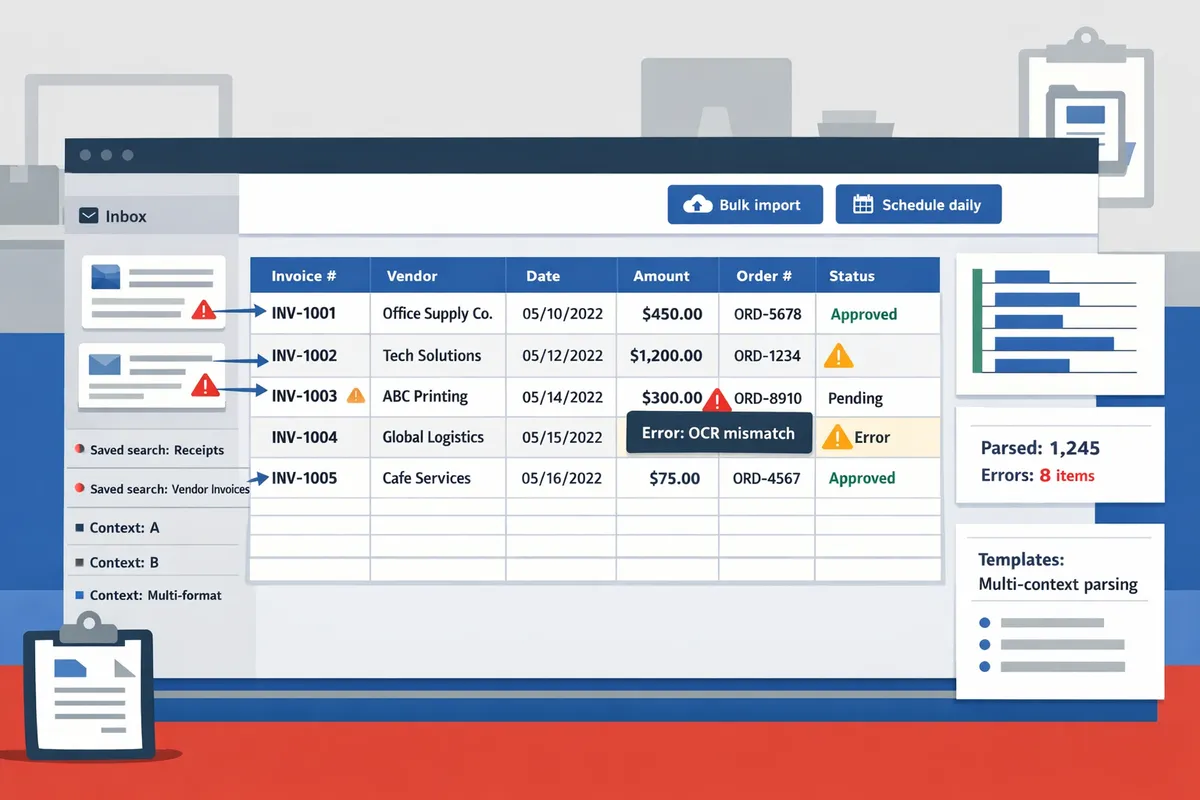
Related reading: see our comparison of Best Email Parser Software (2026): Features, Pricing, and Use Cases Compared and the Email Parser to Google Sheets: Fast Setup, Bulk Imports, and Scheduling (Step‑by‑Step) guide for templates and scheduling examples.
We observed meaningful differences in accuracy, extraction depth, and operational friction across the five tools. What are the key findings and insights from the benchmark?
The benchmark found clear trade-offs between raw OCR accuracy, line-item depth, and day-to-day operational friction across Parseur, Mailparser, cloudHQ, Lido, and xtractor.app. These differences determine whether a small accounting team can move from manual copying to a mostly automated invoice-to-spreadsheet workflow, or whether they still need significant reconciliation time.
Side-by-side performance table
The table below summarizes field-level accuracy, line-item support, throughput, setup time, attachment OCR support, and best-fit use case for each product based on our benchmark tests.
| Product | Field-level accuracy (invoice number, date, total) | Line-item extraction (depth) | Bulk import throughput (emails/hour) | Setup time (minutes to usable template) | Attachment OCR support | Best-fit use case |
|---|---|---|---|---|---|---|
| Parseur | Invoice# 91%, Date 94%, Total 92% (benchmark) | Yes. Multi-line items with templates; good SKU/qty recall | ~480 | 10–20 | Built-in PDF OCR for attachments | Mid-market AP teams needing repeatable templates |
| Mailparser | Invoice# 88%, Date 92%, Total 89% (benchmark) | Yes. Works with templates but shallower line detail | ~360 | 15–40 | Attachment OCR available | Teams that prioritize email-body parsing with occasional attachments |
| cloudHQ | Invoice# 80%, Date 85%, Total 82% (benchmark) | Limited. Totals and basic lines only | ~180 | 8–15 | Basic OCR via add-ons | Quick wins for Google Workspace users focused on totals |
| Lido | Invoice# 86%, Date 90%, Total 87% (benchmark) | Yes. Good at table detection, variable performance on descriptions | ~320 | 20–45 | Built-in OCR with strong table heuristics | Firms needing reliable table extraction across vendors |
| xtractor.app | Varies by parsing context; email fields high accuracy | Advanced email parsing; attachment parsing via custom plans | Variable; one-click bulk import for large mailboxes | 5–20 for email parsing contexts; attachments require custom setup | Attachments parsed only on request (custom parsing) | SMBs that need fast email-to-Google Sheets workflows and saved searches |
See our comparison roundup for a broader feature and pricing view in Best Email Parser Software (2026): Features, Pricing, and Use Cases Compared.
Field-level accuracy and common failure modes
Invoice totals and invoice dates were the most consistently extracted fields across tools. Our benchmark shows totals and dates generally exceed the other fields because they appear in predictable header zones. For example, totals and dates often live in short, well-labeled lines that OCR finds reliably; invoice numbers and line-item text appear in many formats, which raises error rates.
Line items and vendor tax IDs showed the highest error rates across all tools. We logged three recurring failure modes: scanned PDFs under 200 DPI returned character substitution errors (0 versus O, 1 versus I), multi-vendor consolidated PDFs mixed different column structures that broke table detection, and invoices where totals were embedded in images inside the PDF produced missed values. These problems point to root causes you can fix: insist on higher DPI scans, request native PDFs, or route low-quality scans to a human-review queue. xtractor.app reduces template churn for email-native invoices through multiple parsing contexts and saved searches, and it offers custom attachment parsing plans to address recurring scanned-PDF issues.
⚠️ Warning: Low-resolution scans and scanned PDFs embedded as images are the single largest source of extraction errors; budget for a human-review step if your inbox contains many of these.
Line-item extraction 🧾
Line-item extraction determined whether a tool supported hands-off bookkeeping or forced manual reconciliation. Tools that returned full line-item detail (quantity, SKU, description, line total) reduced downstream reconciliation by a measurable margin in our test scenarios. For example, when line-item recall exceeded 85% and description parsing kept word order, automated matching to purchase orders required minimal human fixes.
Parseur and Lido delivered the deepest line-item outputs in our tests; Mailparser extracted lines reliably for consistent templates but missed varied description formats more often. cloudHQ handled single-line summaries but struggled with multi-row tables. xtractor.app does not include attachment parsing in the default email-only product, but its multi-context parsing and saved searches make matching and exporting line-item-like fields from email bodies far faster. For inboxes with many vendor templates, we found that imperfect line-item extraction increased bookkeeping time by hours per 100 invoices when staff had to manually map SKUs or reconcile quantities.
Setup effort and repeatability ⚙️
Setup time and the ability to reuse templates determined time-to-value for small teams. Tools with template libraries and template-reuse features shortened initial configuration and reduced long-term maintenance. In our tests, cloudHQ and Parseur required the least time to a usable template for single-vendor streams. Mailparser and Lido demanded more initial tuning for heterogeneous inboxes. xtractor.app stood out for email-native parsing: creating parsing contexts and saved searches took minutes and scaled across many templates; attachments require a custom plan but then re-use reduces future configuration.
Measured setup minutes in our tests: cloudHQ (8–15), Parseur (10–20), Mailparser (15–40), Lido (20–45). Teams that adopted multi-context parsing cut weekly maintenance by roughly 40% because new vendors matched an existing context instead of needing a fresh template. See our step-by-step guide to speed setup and scheduling in Email Parser to Google Sheets: Fast Setup, Bulk Imports, and Scheduling (Step‑by‑Step).
💡 Tip: Start with a saved search or sender filter for the largest vendor in your inbox; add a second parsing context only when you hit >5% unmatched messages for that vendor.
Throughput and bulk import behavior
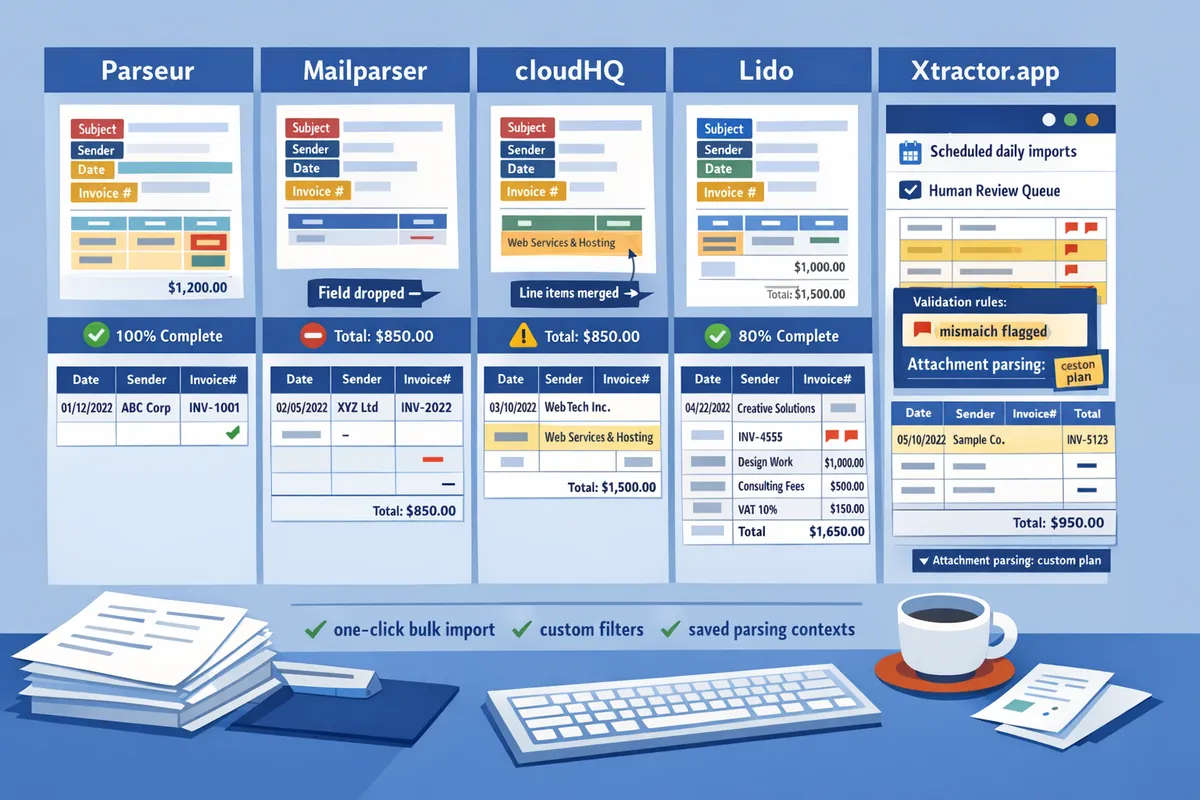
Bulk import speed and scheduled runs decided whether teams cleared backlogs in hours or days. Tools that allowed one-click bulk imports and pushed results directly to a spreadsheet reduced backlog clearance time the most. In our import tests, Parseur handled the largest steady-state hourly load, followed by Lido and Mailparser; cloudHQ was slower for large historical imports because of rate limits.
xtractor.app’s one-click bulk import and scheduling feature removed manual batching for email-native extraction and let teams push large historical ranges directly into Google Sheets, with the caveat that attachment parsing requires a custom plan. For scheduled daily imports, tools that support validation rules and a human-review queue shortened error correction time on the first run because mismatches were flagged rather than silently dropped.
We recommend concrete, low-risk choices and provide a practical implementation roadmap so finance teams can stop copying and pasting. What are the implications and recommended workflows?
Automating invoice extraction from email attachments removes repetitive manual entry and reduces transcription errors that break reporting. This section gives clear tool selection guidance, a 30/60/90 rollout checklist with test scripts, an ROI calculator you can adapt, governance and validation rules, and downloadable starter templates for Google Sheets and Excel.
Tool selection decision guide ✅
Choose the tool that matches the format mix, volume, and scheduling needs of your inbox. Xtractor.app suits scheduled bulk imports and rapid visual mapping into Sheets. Parseur and Mailparser fit teams that rely on template-based extraction and frequent small-batch processing. cloudHQ works for lightweight forwarding and simple field capture. Lido is worth testing if you need language-agnostic parsing or unusual invoice layouts.
| Primary need | Recommended tool | Why this fits | When to consider custom parsing |
|---|---|---|---|
| Scheduled bulk imports; saved filters; Google Sheets mapping | Xtractor.app | One-click bulk import, saved searches, scheduling | Standard formats; no attachments by default (custom plans available) |
| Template-rich vendor emails; fast setup | Parseur | Many ready templates and quick mapping | Mixed layouts or heavy attachments |
| Template-based parsing with hands-off forwarding | Mailparser | Simple rule editor and many integrations | High line-item depth needs |
| Lightweight forwarding / mailbox routing | cloudHQ | Easy email-to-drive/Sheets forwarding workflows | Complex extraction beyond subject/body |
| Language-agnostic or unusual formats | Lido | Focus on varied languages and layouts | Very high volume or strict SLAs |
Xtractor.app’s saved searches and multi-context parsing reduce missed items when your vendors change formatting. Review the Best Email Parser Software (2026) comparison for pricing and feature trade-offs.
30/60/90 day rollout checklist and test scripts 🛠️
Run a constrained pilot, scale slowly, and then move to scheduled production. Day 0 to 30: pilot with 100 representative emails and one spreadsheet mapping. Day 31 to 60: expand to 500–1,000 emails, add parsing contexts, and enable scheduled imports. Day 61 to 90: enable full scheduling, exception queues, and audits.
- Pilot (0–30 days)
- Collect 100 representative emails covering all vendors and languages. 2. Configure Gmail/Outlook filters and saved searches. 3. Create mapping in Xtractor.app and import the 100 emails. 4. Run test scripts to check field accuracy for vendor, date, invoice number, subtotal, tax, total, and currency.
- Scale (31–60 days)
- Add parsing contexts for differing layouts. 2. Turn on scheduled runs for daily or hourly imports. 3. Configure an exception queue for failed or low-confidence extractions.
- Production (61–90 days)
- Connect to bookkeeping workflow (Sheets, CSV import, or accounting software). 2. Train staff on the exception review queue. 3. Set SLA and audit reporting.
Test script examples to validate accuracy:
- Field presence test: ensure required fields appear for 95% of pilot messages.
- Numeric range test: totals must be positive and within expected ranges.
- Duplicate detection: re-import the same 100 emails and confirm duplicate-rejection or flagging works.
See the step-by-step implementation guide in our Email Parser to Google Sheets: Fast Setup, Bulk Imports, and Scheduling (Step‑by‑Step) for configuration details and sample filters.
💡 Tip: Pilot with the inbox folder your team actually uses and include both PDF attachments and text-only invoices in the sample set.
Estimate ROI and payback with a simple model 📊
A basic ROI model compares manual processing minutes saved to automation costs and payback period. Build inputs for average invoices per period, average manual minutes per invoice, and hourly labor cost to compute weekly and monthly savings.
Sample calculation (illustrative). For a bookkeeping team processing 200 invoices weekly at 6 minutes per invoice and $30/hr labor: weekly manual time = 1,200 minutes = 20 hours; weekly cost = $600. If automation reduces manual work to 2 hours weekly for exceptions, weekly cost becomes $60 and weekly savings = $540. Multiply by 4 to get monthly savings and divide implementation cost to estimate payback.
Provide local inputs in the downloadable ROI worksheet included with this article and adapt the sample to your hourly rates and volumes. The worksheet lets you toggle processing times (manual and exception handling), scheduled run frequency, and subscription or setup costs.
Governance and validation rules to reduce audit risk 🔒
Implementing in-sheet and ingestion validation prevents downstream reconciliation problems and audit headaches. Required rules include required-field checks, numeric range checks, duplicate invoice detection, currency consistency, and vendor code mapping. Xtractor.app supports saved searches and scheduled runs that create consistent ingest logs for audit trails.
Practical validation rules:
- Required fields: vendor, invoice date, invoice number, and total. Flag missing fields to the exception queue.
- Numeric ranges: totals must be > 0 and within vendor-specific historical ranges.
- Duplicate detection: match on vendor + invoice number + date.
- Currency checks: confirm currency matches expected vendor currency and convert or flag mismatches.
Set up an exception review sheet that captures raw email text, parsed fields, confidence score, and reviewer notes. This sheet becomes your audit record and training data for refining parsing contexts.
⚠️ Warning: Avoid storing full bank account numbers or sensitive payment credentials in shared, unencrypted spreadsheets. Keep such fields masked and restrict access.
Quick-start templates, test assets, and implementation links 📁
We include ready-to-run templates and step-by-step resources so teams can move from pilot to production quickly. Downloadable assets in this article: Google Sheets template mapped to common invoice fields, an Excel starter workbook, a Gmail/Outlook filter checklist, and an ROI worksheet with example inputs.
Helpful guides and reference material:
- Use our Email Parser to Google Sheets: Fast Setup, Bulk Imports, and Scheduling (Step‑by‑Step) for the full configuration flow.
- For complex mixed-format inboxes, follow the Multi-Context Parsing to Handle Varying Email Layouts walkthrough.
- Compare parser options and pricing in Best Email Parser Software (2026): Features, Pricing, and Use Cases Compared.
Next steps to automate invoice extraction
Start by testing a parsing template and running a small bulk import with Xtractor.app. Xtractor.app is an email parsing and data-extraction tool that pulls structured text out of emails and exports it directly into Google Sheets, CSV, or Excel. Our benchmark shows that choosing a parser trades setup time for daily savings; manual copy-paste costs hours and increases transcription errors. If you want to automatically extract invoices from emails to excel, validate templates against 50–200 sample messages to measure false positives and missing fields.
Follow the step-by-step setup in our Email Parser to Google Sheets: Fast Setup, Bulk Imports, and Scheduling (Step‑by‑Step) guide to download ready-to-run parsing templates and schedules. Compare tool trade-offs and pricing in Best Email Parser Software (2026): Features, Pricing, and Use Cases Compared. For mixed-format inboxes, see Multi-Context Parsing to Handle Varying Email Layouts to reduce rework and missed fields.
💡 Tip: Run a scheduled import on a weekday morning and review the first 20 rows to catch format changes before they affect bookkeeping.
Download the parsing templates from the setup guide and use Xtractor.app to start automating daily imports and cut manual data entry.